Garage Door Keypad Not Accepting the Code

Royal Garage Doors has customer feedback on its Etobicoke Google profile and technicians with hands-on experience installing and repairing doors across Toronto and the wider GTA.
Why is my garage door keypad not accepting the code?
A garage door keypad not accepting the code is usually a weak battery, a changed code, or a lost wireless link to the opener — in that order of likelihood. Royal Garage Doors recommends checking the battery first, since it resolves most cases before any reprogramming is needed. A deeper opener-side fault runs $120–$550 to repair.
How do I know if my garage door keypad battery is dead?
The backlight or button glow can still work on a battery too weak to actually transmit a signal, so a lit keypad doesn't mean it has enough power. Swap in
- Customer feedback
- Read our Google reviews (Etobicoke profile)
- Experience
- Garage door service across the GTA
- Repair warranty
- 1-year parts and labour unless a specific written warranty overrides it
- Author
- Royal Garage Doors, Garage door repair and installation
Start with the battery, not the code
Before you touch a single digit, replace the keypad's battery. It sounds too simple, but a weak battery is the single most common reason a wireless keypad stops accepting a code — not because the code is wrong, but because the keypad no longer has enough power to transmit the signal to the opener at all. You press Enter, the backlight looks fine, and nothing happens.
Most wireless keypads run on a small battery (a coin cell or a set of AAA batteries, depending on the model and brand) tucked behind a small door on the back. Swap it for a fresh one, wait about 10 seconds, and try the code again before doing anything else. If the keypad suddenly works, you're done — no reprogramming needed.
Confirm you're actually entering the current code
The second most common cause isn't a malfunction at all — it's a code that changed and nobody told you. This happens more often than homeowners expect:
- Someone in the household reprogrammed it — a new keypad code was set and the old one deleted without a group text going out.
- A power outage reset the opener's memory on older or budget opener models, wiping stored codes entirely (this is rare on current LiftMaster, Chamberlain, and Genie units, which retain memory through outages, but it still happens on aging systems).
- You're pressing Enter/Stop too fast or too slow — most keypads need the code entered cleanly followed by a distinct press of the Enter (sometimes labeled Stop) button, with no long pause in between.
Try entering the code slowly and deliberately, one full second between digits, and press Enter firmly at the end. If that still doesn't work, move to the next step.
Check whether the keypad lost its link to the opener
Wireless keypads aren't hard-wired to the garage door opener — they talk to it over the same short-range radio signal as your remote. That link, called "pairing" or "programming," can drop on its own after:
- A battery change (some keypad models briefly lose their stored code during the swap)
- A power surge or outage at the opener itself
- The opener's motor unit being replaced or reset (common after an opener repair)
- Someone accidentally holding the opener's Learn button, which clears all paired remotes and keypads at once
If the battery is fresh and the code is correct but nothing happens, this is almost always the issue. The fix isn't a new battery or a new code — it's re-pairing the keypad to the opener, which takes about five minutes.
Look for weather damage to the keypad itself
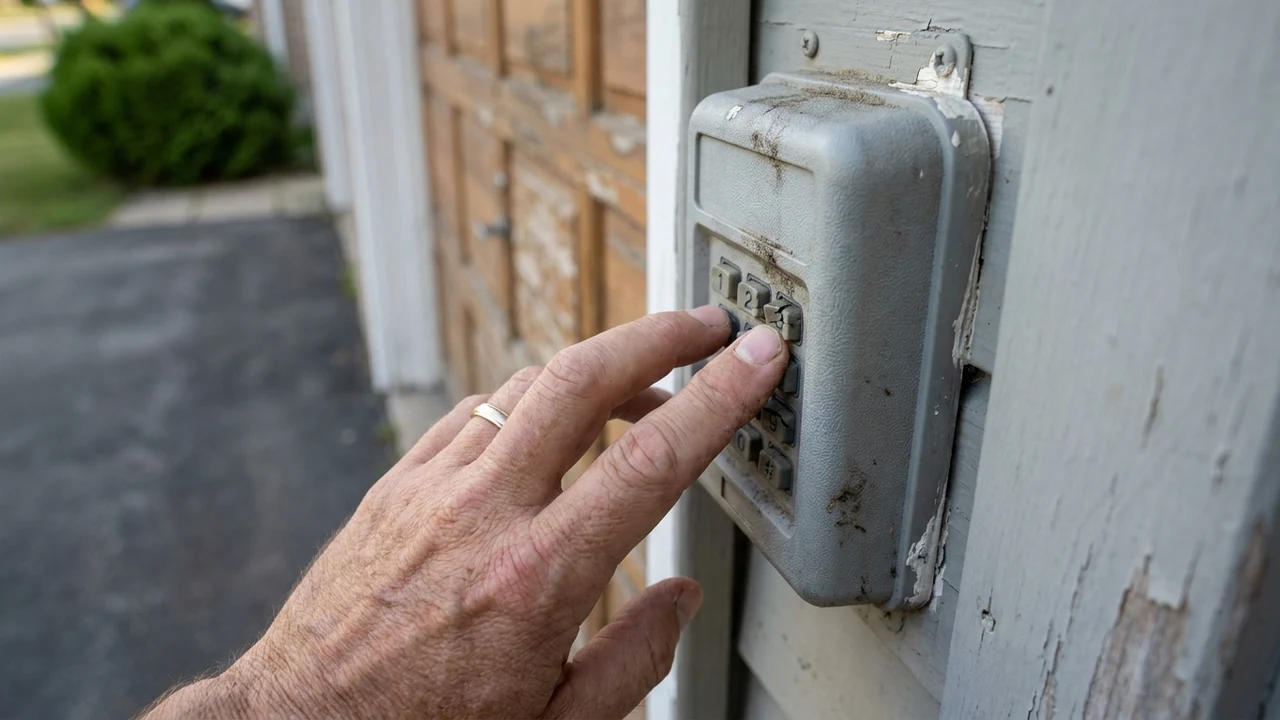
Outdoor keypads in the GTA take a beating that indoor electronics never see. A few things to check on the unit mounted by your garage:
- Corrosion inside the battery compartment — winter road salt and humidity get into even "weatherproof" housings over a few seasons, especially on keypads mounted low near the driveway.
- Cracked or sun-warped rubber buttons — after a few Ontario summers, the rubber overlay can stiffen or split, so a button that looks pressed isn't making contact underneath.
- Water inside the housing after freezing rain or a pressure-washed driveway — moisture can short the keypad even if it looks dry on the outside.
If you see rust on the battery contacts, wipe them down with a dry cloth and try again. Cracked buttons or visible water intrusion usually mean the keypad itself needs replacing rather than reprogramming.
How to reprogram a wireless keypad
If the battery and code are both fine, re-pairing is the next step. The exact button varies by brand, but the process is nearly identical across LiftMaster, Chamberlain, and Genie openers:
- Find the Learn (or Program) button on the opener motor unit itself — a small button under a lens cover on the body of the unit mounted to your garage ceiling, not on the wall control.
- Press and release the Learn button. An indicator light near it will start blinking, giving you roughly 30 seconds to complete the next step.
- On the keypad, enter a 4-digit PIN of your choosing, then press and hold Enter (or Stop) until the opener's motor light blinks or you hear a click.
- Test the code. If the door responds, the keypad is re-paired and you're finished.
If the Learn button doesn't blink, or the door never responds during that 30-second window, the opener's receiver — not the keypad — may be the actual fault, which is a different repair.
When the problem isn't the keypad at all
Occasionally a keypad that "won't accept the code" is really an opener problem wearing a keypad-shaped disguise. Signs it's the opener side:
- Your remote also stopped working around the same time as the keypad.
- The opener motor makes no sound or light response to any input, wired or wireless.
- The wall-mounted control panel inside the garage also fails to open the door.
If more than one control method fails at once, the issue is likely the opener's logic board or receiver, not the keypad itself — that falls under an opener repair rather than a keypad swap, and runs $120–$550 depending on the part involved (a receiver or board replacement sits at the higher end; a simple reset or minor fix at the lower end).
How long a keypad should last before this becomes routine
A quality wireless keypad on an opener installed by a professional typically holds up for 5-8 years of GTA weather before battery contacts, button rubber, or the radio module start to degrade on their own. If you're troubleshooting this same keypad for the second or third time in a year, replacing it — rather than repeatedly re-pairing an aging unit — is usually the more practical call. It also carries less risk than living with a keypad that works intermittently, especially if you rely on it to let in family, dog walkers, or a cleaning service while you're out.
Royal Garage Doors recommendation
Work through the order above before assuming the worst: battery first, then the code itself, then re-pairing, then a look for physical or weather damage. That sequence resolves the large majority of keypad complaints without any parts or a technician visit at all.
If the keypad still won't accept a code after re-pairing, or if your remote and wall control have also stopped responding, the fault is likely in the opener itself. Royal Garage Doors has served the GTA with customer feedback on our Etobicoke Google profile, and the service call is free with any repair — a $120 diagnostic fee applies only if you decide not to proceed after the assessment. Book a diagnostic visit and we'll trace it to the actual cause, whether that's the keypad, the receiver, or the logic board. See our full pricing page for current opener repair rates.
Related reading: How to Store Your Garage Door Remote So It Doesn't Get Lost or Stolen.
Frequently Asked Questions
How do I know if my garage door keypad battery is dead?
The backlight or button glow can still work on a battery too weak to actually transmit a signal, so a lit keypad doesn't mean it has enough power. Swap in a fresh battery before troubleshooting anything else — it resolves the issue more often than any other single fix, and it rules out the cheapest cause first.
Can I reprogram a garage door keypad myself?
Yes, on most LiftMaster, Chamberlain, and Genie openers. Press the Learn button on the opener motor unit, then within about 30 seconds enter a new PIN on the keypad and hold Enter until the opener responds. If the Learn button doesn't blink or the door never responds in that window, the opener's receiver may need a technician look.
Why does my garage door keypad work sometimes but not always?
Intermittent response usually points to corrosion on the battery contacts, a weakening battery that hasn't fully died yet, or cracked rubber buttons that only make contact when pressed at a certain angle. Weather-damaged housings are the most common cause of intermittent (rather than total) keypad failure in the GTA.
Does cold weather affect garage door keypads in Toronto and the GTA?
Yes. Winter cold stiffens rubber button overlays and can slow battery performance, while road salt and humidity corrode battery contacts inside outdoor-mounted keypads over a few seasons. A keypad that worked fine all summer and starts acting up in late fall is often showing early weather wear rather than a sudden failure.
What if reprogramming doesn't fix the keypad?
If a fresh battery and a completed re-pairing still don't get a response, and your remote or wall control have also stopped working, the fault is likely in the opener's receiver or logic board rather than the keypad itself. That's an opener repair, priced $120–$550 depending on the part, and the service call is free with any repair.
Sources & standards: Garage door safety follows the UL 325 standard for automatic operators. For safe manual operation, see Chamberlain's emergency-release guidance. Pricing reflects current Royal Garage Doors rates for the GTA.
The bottom line: done right, the result is a garage door that opens quietly, balances correctly and is safe to use every day — backed by Royal's 1-year labour warranty so the outcome lasts.